
November 27, 2026
Black Friday 2026: 30% Off SwiftServer Lifetime Premium
SwiftServer Lifetime Premium is 30% off for Black Friday on iPhone, iPad, and Mac. In 2026 SwiftServer added port forwarding, jump hosts, Windows monitoring, Mosh, Local Shell on the Mac, and a shell inside Docker containers.
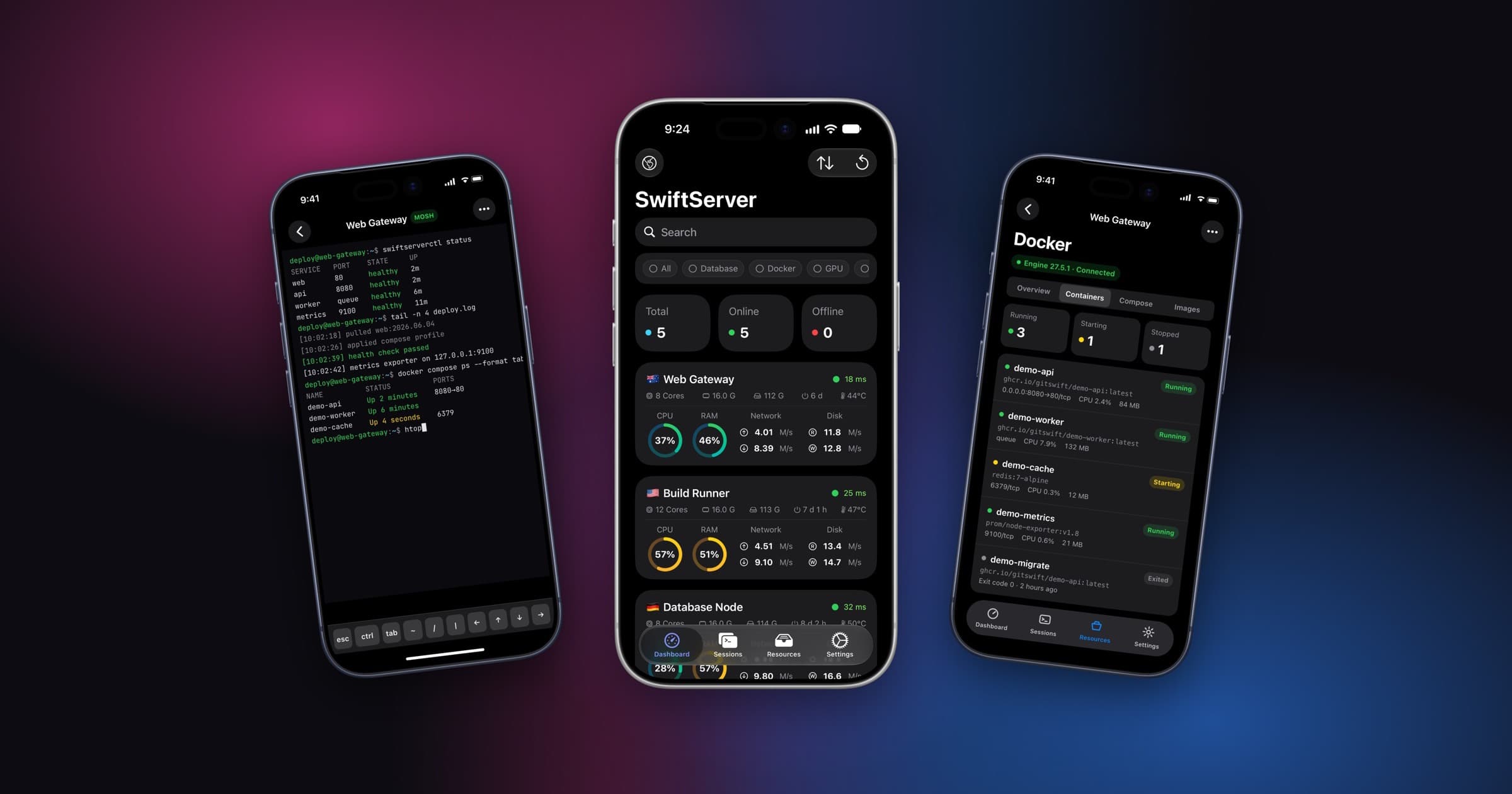
From November 27 through December 4, 2026, SwiftServer Lifetime Premium is 30% off. The offer is open to everyone on iPhone, iPad, and Mac, and one purchase covers all three.
Thank You
This year we shipped 18 versions of SwiftServer. Almost every one of them carries a change that started with a user writing to us: a diagnostic log, an App Store review, or a line in the Telegram group saying something felt awkward. Thank you to everyone who subscribed, bought, or reported a problem. SwiftServer is what it is today partly because of you.
SwiftServer This Year
- January, 1.2.0. The dashboard started monitoring macOS hosts, with CPU, memory, disk, network, and Docker status alongside your Linux machines.
- May, 2.0. The SSH connection layer was rebuilt on Traversio, our open-source Swift SSH engine, so the terminal, monitoring, SFTP, and port forwarding share one connection foundation. It added local, remote, and dynamic SOCKS port forwarding, connection proxies and SSH jump hosts, a Global View that puts your servers on a map, and a dashboard you can arrange around the cards you watch.
- July, 2.1.0. Windows servers got the same live dashboard as every other machine. The terminal can use Mosh per machine, so a session survives Wi-Fi handoffs, sleep, and IP changes. The Docker panel was rebuilt from the inside out, with a new Overview tab, live per-container stats, and an event timeline.
- September, 2.2.0. The Mac got Local Shell, a menu bar panel that keeps monitoring after the last window closes, and a switch to pause monitoring. Every platform got a shell inside running containers, live Compose logs, and a restart action on the status page.
- October and November, 2.2.1 to 2.2.3. The terminal key bar on iPhone and iPad was rebuilt to sit on the system keyboard. Docker logs gained colorized lines, level filters, and search. SwiftServer added full support for iPhone Duo, and on the Mac, terminal, SFTP, and port forwarding sessions can keep running after the main window closes.
The code that speaks SSH and Mosh and draws the terminal is open source as three Swift packages, Traversio, TraversioMosh, and SwiftTerminal, under GitSwiftHQ on GitHub. Traversio's documentation is at traversio.org.
What You Buy Today, and the SwiftServer That Comes Next
We shipped 18 versions this year, and the plans ahead are bigger. Lifetime Premium is a single purchase, so every Premium feature that arrives from here on is already yours. This is what we are building:
- An all-new Docker panel. Redesigned from top to bottom to feel like an app that came with the system. The moment a container starts, stops, or restarts, the page changes with it, and every action on containers, images, and Compose projects is more reliable.
- SFTP that works like the Finder. Move and copy files right on the server and copy their paths, so managing remote files feels like tidying a local folder.
- A terminal upgraded for coding agents. Run several coding agents on one server and see at a glance what each session is doing. Each row shows the shell's own title, or a name you give it. Browse a server's tmux sessions and attach with one tap. Put your iPhone back in your pocket, and sessions stay alive longer in the background, ready when you return.
- Monitoring cards you define. Pick the metric you want to watch and make a card for it, then arrange the detail page for each machine.
- Connections that pick their own route. Direct on your home network, forwarded when you are away: SwiftServer detects which path works and switches to it. SSH gains agent forwarding, security keys, and user certificates.
- Batch management. Select many machines, SSH keys, or identities and handle them in one go, with multi-item drag and drop on the Mac.
- Support for older systems. The minimum requirement is planned to drop to iOS 17 and macOS 14, bringing SwiftServer to older devices.
In a Trial? You Can Wait for New Year
The yearly subscription starts with a 14-day free trial, and the monthly one with a 3-day trial. If you have just started a trial and want a few more days before deciding, there is no need to rush this week. From December 23, 2026 through January 9, 2027, Lifetime Premium will be 30% off again for New Year.
What Lifetime Premium Unlocks
- Live dashboard monitoring for an unlimited number of servers.
- iCloud sync across your Apple devices.
- IP location on status pages: city, organization, and the map pin.
- Jump hosts and connection proxies.
- Several port forwarding sessions running at once.
- Docker management: container operations, logs, Compose actions, and a shell inside containers.
- Terminal customization: themes, fonts, cursor, and scrollbar.
- SFTP text editing and file preview.
- The menu bar panel on the Mac.
- Every Premium feature we add from here on.
How to Buy
No code is needed. Open SwiftServer, go to Settings → SwiftServer Premium, and choose Lifetime. The App Store purchase sheet shows the discounted price. The offer is available only inside the app.
Questions about the offer or Premium? Write to [email protected].
Related posts
September 24, 2026
SwiftServer 2.2.0: Local Shell, a Menu Bar Panel, and a Shell Inside Any Container
SwiftServer 2.2.0 adds a local terminal on your Mac, a menu bar panel that keeps monitoring after the last window closes, shells into running Docker containers, live Compose logs, machine restart, and a pause switch for monitoring.
June 8, 2026
The All-New SwiftServer 2.0, Plus 30% Off for WWDC
Celebrate WWDC 2026 with 30% off SwiftServer Lifetime Premium, and see why the redesigned SwiftServer 2.0 is the best time yet to upgrade.