
July 17, 2026
SwiftServer 2.1.0: Windows Monitoring, Mosh, and a Rebuilt Docker Panel
SwiftServer 2.1.0 brings Windows server monitoring, Mosh terminal sessions, and a rebuilt Docker panel, plus a refreshed global map, IPv6 support, and a faster, steadier dashboard.
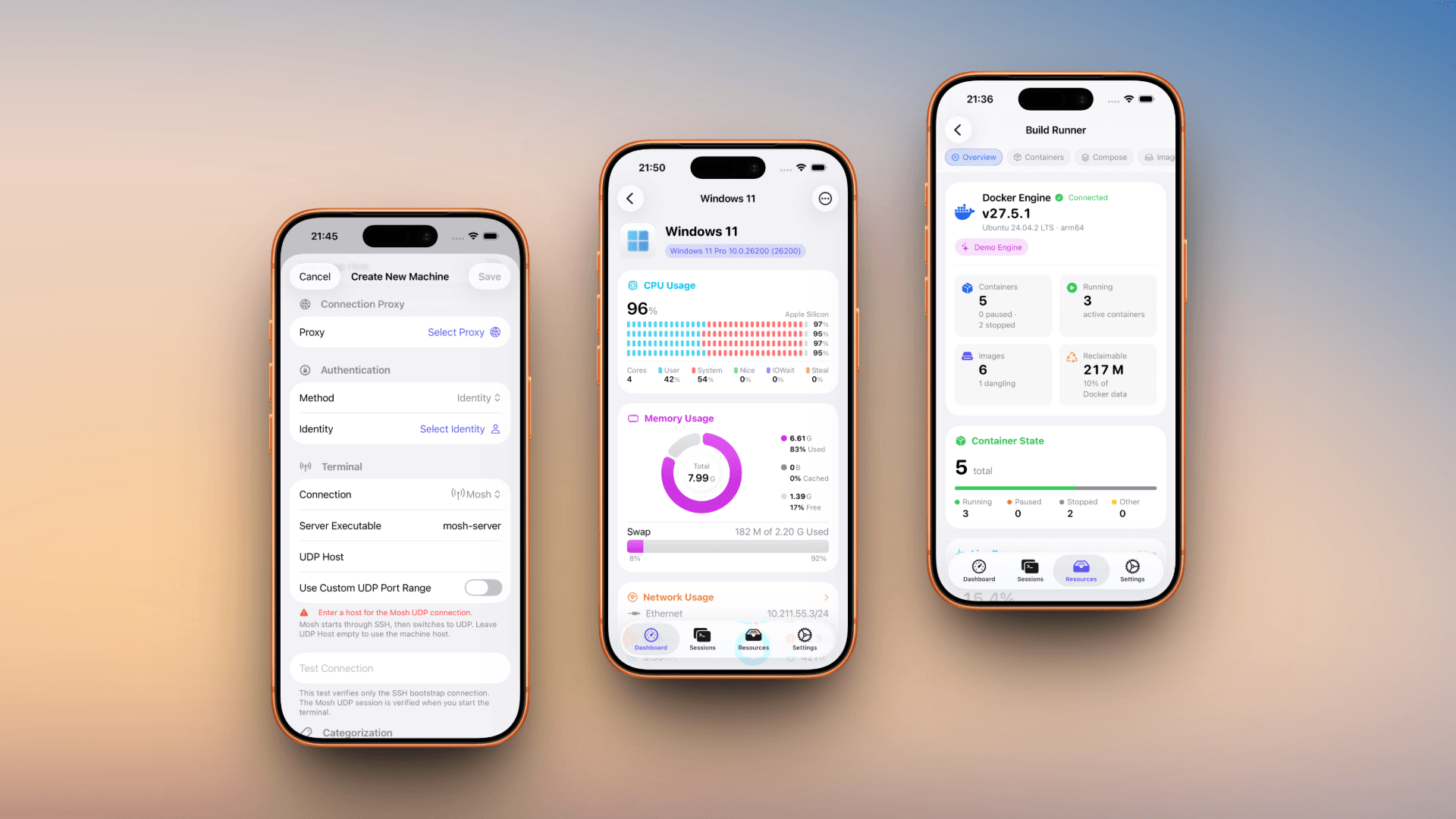
SwiftServer 2.1.0 is out now. Alongside a long list of stability and performance work, it adds monitoring for Windows servers, Mosh as a terminal transport, and a Docker panel rebuilt from the ground up.
Monitor Windows Servers Too
Until now, SwiftServer expected the machine on the other end to behave like Linux or macOS, so Windows servers didn't work.
A Windows host now gets the same live dashboard as any other machine: CPU, memory, disk, and network usage, the running process list, and GPU stats when an NVIDIA card is present. Panels that don't apply to Windows, like load average and vnStat, are hidden automatically. Docker and per-core temperature readings aren't available on Windows hosts yet.
Mosh, for Connections That Shouldn't Drop
Mosh is now a terminal transport you can choose per machine, alongside plain SSH. It keeps a session alive through Wi-Fi handoffs, sleep, and IP changes, so you can switch networks mid-session without reconnecting or losing your scrollback.
SwiftServer now waits for the server to confirm a connection before calling it successful, so a blocked connection shows a clear error. Session history and the Dock record whether a session used SSH or Mosh, so switching between the two stays predictable.
A Rebuilt Docker Panel
The Docker panel has been rebuilt from the inside out. The result is live data, fewer failed connections, and a panel that does noticeably more than the version before it.
The Overview tab is new. It shows container and image counts as headline numbers, a breakdown of disk usage with reclaimable space called out, your top CPU and memory consumers, and any unhealthy containers or daemon warnings. Containers, Compose projects, images, volumes, networks, and a live event timeline each get their own view, with live per-container stats and charts. While connecting, the panel shows each step as it happens.
Everything Else Worth Knowing
Smaller changes in this release:
- Global view. Servers on the map now show a flag, name, and latency reading anchored precisely to their coordinates, with a live status pulse. You can export the current view as a PNG, in light or dark, to save or share a snapshot of your fleet.
- Port forwarding suggestions. When terminal output mentions a local address, such as a dev server printing
localhost:3000, the terminal offers to forward that port on the spot. A new toggle in Terminal settings turns the suggestion on or off. - Standalone terminal windows on macOS. Pop a session out into its own window from the window menu, the toolbar, or a right-click. It keeps running after you close SwiftServer's main window.
- IPv6 and dual-stack IP info. IP location lookups now work over IPv6. Servers with both an IPv4 and an IPv6 address get a picker to switch between them.
Faster and Steadier
Opening a server's detail view is noticeably faster, and live monitoring now refreshes smoothly, without the stutter, flicker, or lost scroll position that could creep in before.
We also fixed a batch of connection and sync issues: a reconnect bug that could leave an old connection running in the background, a keychain sync setting that wasn't always respected, a map view that could get stuck redrawing during navigation, and a few others like them.
SwiftServer 2.1.0 is available now on the App Store. Questions, feedback, or something not working as it should? Write to [email protected]
Related posts
June 8, 2026
The All-New SwiftServer 2.0, Plus 30% Off for WWDC
Celebrate WWDC 2026 with 30% off SwiftServer Lifetime Premium, and see why the redesigned SwiftServer 2.0 is the best time yet to upgrade.
April 22, 2025
Major Update - Powerful Docker Management Comes to SwiftServer 1.1.0
Manage Docker containers, images, volumes, and compose files directly from your iOS and macOS devices with the latest SwiftServer 1.1.0 update.