
June 8, 2026
The All-New SwiftServer 2.0, Plus 30% Off for WWDC
Celebrate WWDC 2026 with 30% off SwiftServer Lifetime Premium, and see why the redesigned SwiftServer 2.0 is the best time yet to upgrade.
On this page
- Why SwiftServer 2.0 Is The Right Time To Jump In
- Powered By Traversio
- More Reliable Connections
- Port Forwarding, Built For Real Work
- Proxy Connections And SSH Jump Servers
- A Safer Storage Strategy
- A Redesigned Global View
- A Dashboard You Can Shape Around Your Workflow
- Widgets, Live Activity, And Faster Checks
- Better Terminal Experience
- What Lifetime Premium Unlocks
- Get SwiftServer 2.0
WWDC season is here, and we are celebrating with a limited-time offer: SwiftServer Lifetime Premium is 30% off from June 7 through June 27, 2026.
If you have been waiting for the right moment to upgrade, this is the one. SwiftServer 2.0 is a new foundation for managing servers from Mac, iPad, and iPhone, with a redesigned connection core, a stronger security model, new network workflows, and a much more flexible operations dashboard.
Why SwiftServer 2.0 Is The Right Time To Jump In
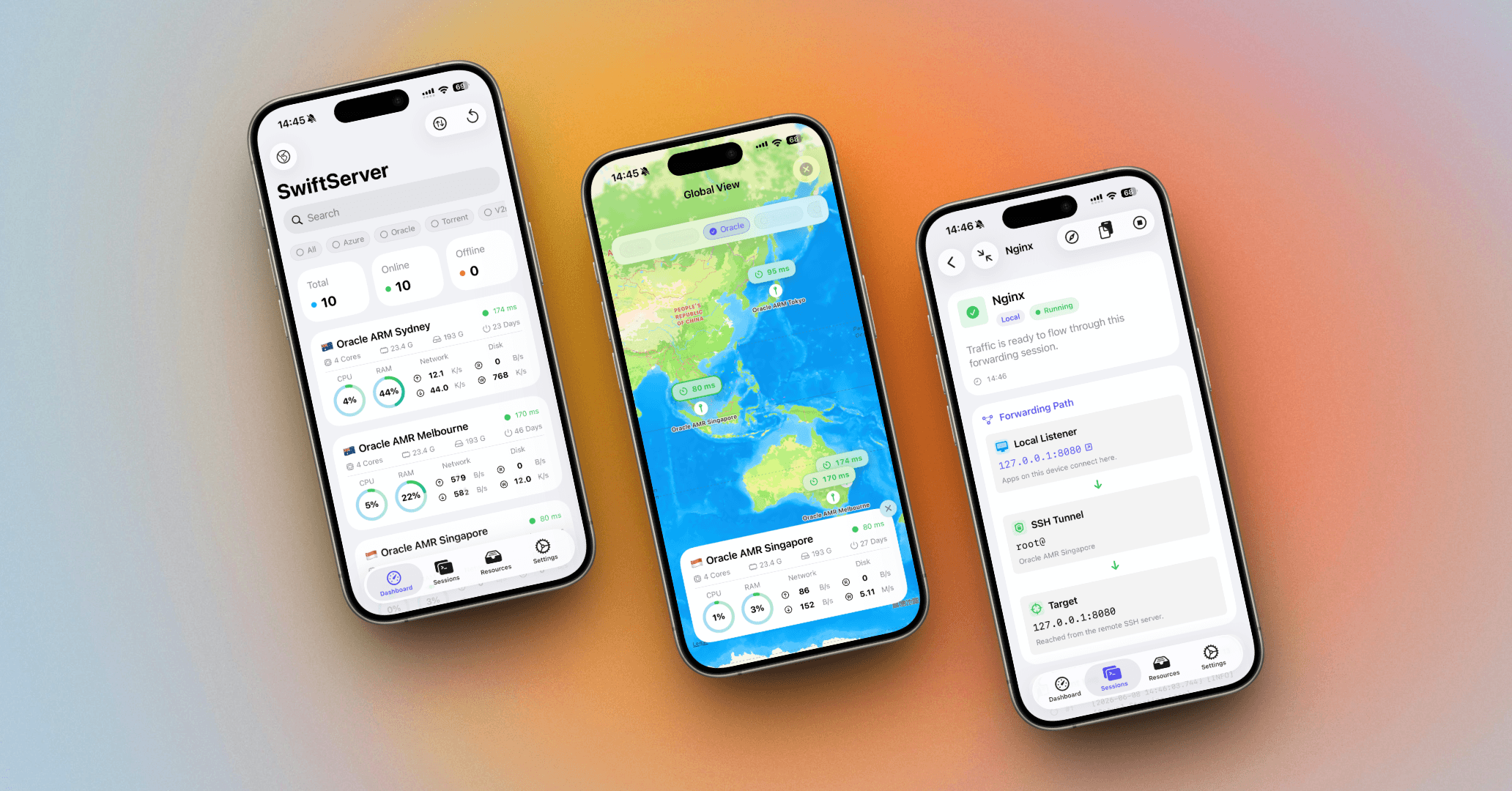
SwiftServer started with a simple idea: server management should feel at home on Apple devices. Version 2.0 brings monitoring, SSH terminal sessions, SFTP, Docker visibility, port forwarding, proxy routes, jump servers, widgets, Live Activity, and session history together in one app.
Server work is rarely one clean task. You check a machine, open a terminal, inspect a process, forward a local service, grab a file, compare another host, and come back later to the same context. SwiftServer 2.0 is built around that workflow.
Powered By Traversio
The biggest change in SwiftServer 2.0 is under the surface: the SSH connection layer has been rebuilt around Traversio.
Traversio is our Swift-native SSH connection core. It handles the pieces that have to be right every time: connection setup, authentication, host key verification, diagnostics, proxy routing, jump-host routes, SFTP, and port forwarding. Terminal, monitoring, SFTP, and forwarding now share this connection foundation.
In practice, connections have clearer lifecycle handling, authentication errors are easier to understand, and host-key trust is part of the flow. Proxy connections and SSH jump servers work across more of the app. Every improvement to Traversio reaches every feature built on top of SSH.
Traversio is also open source. The complete engine is on GitHub, where you can read the code that handles your connections, follow development, and file issues.
More Reliable Connections
SwiftServer 2.0 puts a lot of attention into connection stability, with a more structured model for SSH sessions, connection diagnostics, host-key decisions, keyboard-interactive prompts, legacy RSA compatibility, and secure key loading.
When something does not connect, SwiftServer helps you understand why, whether the issue is authentication, host-key trust, a proxy route, or the remote server itself.
Port Forwarding, Built For Real Work
Port forwarding is one of the headline additions in SwiftServer 2.0, designed around the way developers and operators use tunnels.
You can create saved forwarding rules, start them from SwiftServer, inspect the active forwarding path, copy the endpoint, and jump back into the session later. SwiftServer supports:
- Local forwarding for reaching a remote service from your device.
- Remote forwarding for exposing a local endpoint through the server.
- Dynamic SOCKS forwarding for routing client traffic through SSH on demand.
Open an internal web dashboard, reach a database bound to localhost on a remote machine, test a service behind a firewall, or create a SOCKS tunnel, all without rebuilding the command by hand each time.
Rules can use machine defaults, connection proxy profiles, and the same SSH connection foundation as terminal and SFTP sessions.
Proxy Connections And SSH Jump Servers
Many servers sit off the open internet, and many teams keep them there on purpose. SwiftServer 2.0 adds first-class support for connection proxy profiles and SSH jump server routes.
Proxy profiles let SwiftServer connect through networks that require an intermediate proxy. SSH jump servers route you through a bastion host to the target machine. Build these routes once and reuse them in every session.
For people managing private infrastructure, homelabs, staging networks, or production systems behind bastion hosts, this is a major upgrade.
A Safer Storage Strategy
Credentials, passwords, private keys, key passphrases, and proxy credentials now move through a Keychain-backed storage strategy, with migration and validation designed around the new 2.0 data model.
Trusted host keys are part of the connection flow as well. SwiftServer remembers the hosts you trust and warns when a known host changes, and everyday SSH work stays light.
A Redesigned Global View
The new Global View puts your server fleet on a map. Filter by tags, check latency and status, and open the machine that needs attention.
It is especially useful when your servers live across regions, clouds, customers, or physical locations, because that geography becomes part of the dashboard.
A Dashboard You Can Shape Around Your Workflow
You can customize the status layout so the cards and metrics you care about are where you expect them.
Some people care most about CPU, memory, and disk. Others watch latency, network throughput, Docker state, uptime, or selected storage volumes. SwiftServer 2.0 lets the dashboard follow what you watch.
Widgets, Live Activity, And Faster Checks
Widgets keep server status visible from the system, and Live Activity tracks active Terminal, SFTP, and port forwarding sessions while they are running.
Quick checks and active sessions stay in view without constantly reopening the app.
Better Terminal Experience
The terminal in SwiftServer 2.0 is more stable and more customizable. You get more built-in terminal themes through SwiftTerminal, plus controls for font, cursor, scrollbar behavior, and terminal appearance.
On iOS, Select Text and Copy All help when you are reading logs, copying output, or sending a command result to a teammate from your phone.
What Lifetime Premium Unlocks
During the WWDC offer, Lifetime Premium is 30% off and unlocks the full SwiftServer experience:
- Unlimited saved servers.
- iCloud sync across supported Apple devices.
- Advanced monitoring and IP/network information.
- SSH customization.
- Terminal customization.
- SFTP text editing and file preview.
- Premium workflows such as jump hosts, port forwarding, and other advanced server-management features.
- Ongoing feature updates as SwiftServer continues to grow.
No coupon code is needed. Open SwiftServer, go to Settings, choose Premium, and the App Store purchase flow will show the promotional price during the offer window.
Get SwiftServer 2.0
SwiftServer 2.0 is the biggest update we have shipped so far.
Need help with the offer, Premium, SSH setup, port forwarding, or migration? Contact us anytime at [email protected].
Related posts
April 22, 2025
Major Update - Powerful Docker Management Comes to SwiftServer 1.1.0
Manage Docker containers, images, volumes, and compose files directly from your iOS and macOS devices with the latest SwiftServer 1.1.0 update.
February 11, 2025
Introducing SwiftServer - Linux Monitoring, SSH Terminal, and more
Check out our brand new SwiftServer. Monitor and manage your servers in real-time on iOS and macOS.